Inhaltsverzeichnis
Fit GUI: Report Panel
The report panel displays a summary report of the fit performed, with all important and interesting parameters necessary to make a sound decision about the quality of the fit.
<figure>
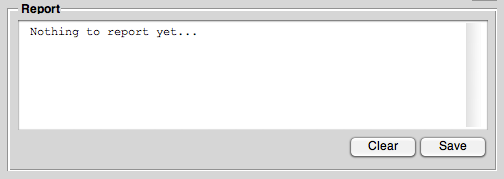 <caption>The report panel of the Fit GUI. Here, all the results from the fit get displayed.</caption>
</figure>
<caption>The report panel of the Fit GUI. Here, all the results from the fit get displayed.</caption>
</figure>
Details of the report
The most important informations are summed up at the very beginning of the report. They include:
- File name of the dataset the fit was performed for.
- Fit function used (both its display name and its Matlab representation).
- Values of the coefficients after the fit.
This is followed by the complete output of the fit function and a summary.
A typical beginning of such a report may look like this:
File: somefile.taz
Fit function: "Biexp. decay"

   c(1)*exp(c(2)*x+c(3))+c(4)*exp(c(5)*x+c(6))

Coefficients:
 c(1)	0.005679
 c(2)	0.000255
 c(3)	0.002061
 c(4)	0.012412
 c(5)	-0.040130
 c(6)	0.015377

--------------------------------------------------------
Output of fit function:

Iteration  FuncCount    min f(x)   Procedure
       0          1      0.594052
       0          1      0.594052
       1          7      0.561290  initial simplex
       2          9      0.519123  expand
       3         10      0.519123  reflect
       4         11      0.519123  reflect
       5         13      0.459560  expand
       6         14      0.459560  reflect
       7         16      0.405543  expand
       8         17      0.405543  reflect
       9         19      0.351877  expand
Please note: It is very important to have a short look at the very end of the report to see whether the fit function returned happily or whether it exited due to exceeding one of the options. In the latter case, it is highly recommended either to change the initial values for the coefficients or to change the respective option in the parameter window.
An example of such a case is shown below:
     749       1193      0.001088  contract inside
     750       1195      0.001088  contract inside
     751       1197      0.001088  contract inside
     752       1199      0.001088  contract outside
     753       1200      0.001088  reflect
     753       1200      0.001088  reflect

SUMMARY
Algorithm: Nelder-Mead simplex direct search
Number of iterations: 753
Number of function evaluations: 1200
Exiting: Maximum number of function evaluations has been exceeded
         - increase MaxFunEvals option.
         Current function value: 0.001088
Here, you clearly see that Matlab suggests to increase the value for MaxFunEvals. This can be done using the parameters window that you can access by pressing <key>Parameters</key> in the fit panel.
The same fit as shown above now works fine after slightly increasing the value for MaxFunEvals from “200*numberofvariables” to “300*numberofvariables”, as can be seen from the end of the respective fit report:
     827       1333      0.001088  contract inside
     828       1335      0.001088  contract inside
     829       1337      0.001088  contract inside
     830       1339      0.001088  contract inside
     830       1339      0.001088  contract inside

SUMMARY
Algorithm: Nelder-Mead simplex direct search
Number of iterations: 830
Number of function evaluations: 1339
Clear
To clear the report window, press the <key>Clear</key> button below.
Save
The report can be saved to a text file via the <key>Save</key> button. This will open the OS-specific file dialogue and lets you choose a (text) file name to save the report to.